Dir
| Toolbar | Menu |
|---|---|
|
|
Analyze Direction |

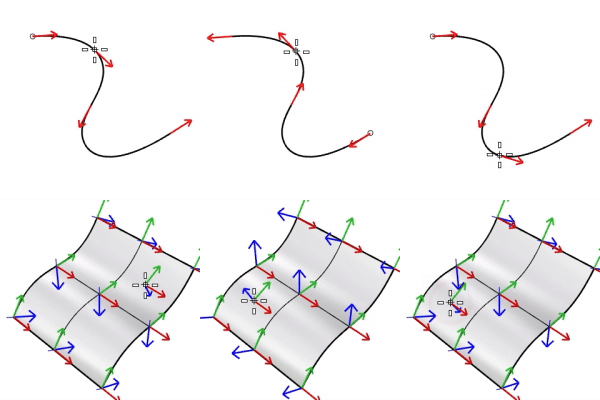
The Dir command displays and edits an object's direction or normal direction.
Steps
-
Select objects.
Arrows show the directions on curves or normal directions on surfaces.
If a single object is selected, move the cursor on the object to inspect the direction at the cursor location.
-
Click the mouse button on an object to flip (reverse) the direction for that object.
The command-line provides more flipping options.
Command-line options
Single curve option
Flip
Reverses the direction.
Multiple curve options
FlipAll
Reverses the directions on all selected curves.
Single surface options
UReverse/VReverse
Reverses the U or V direction.
SwapUV
Exchanges the U and V directions.
Flip
Reverses the normal direction.
Multiple surface options
FlipAll
Reverses the normal directions on all selected surfaces.
NextMode
Cycles through the Mode options.
Mode
FlipU/FlipV
Reverses the U or V direction for all selected surfaces.
FlipNormal
Reverses the normal direction for all selected surfaces.
SwapUV
Exchanges the U and V directions for all selected surfaces.
ShowOccludedArrows
Controls whether direction arrows hidden behind objects are displayed.
Set to No to reduce visual clutter by displaying only visible direction arrows.
Note
-
Closed polysurfaces, surfaces, and lightweight extrusion objects cannot have their normal direction facing toward the interior of the object.
-
The direction and normal direction arrow color is controlled by the Tracking lines setting in Appearance: Colors Options.
Their size is controlled by the Direction arrow icon settings in Appearance Options.
- Search for "DirectionArrow" in Advanced settings to access more arrow appearances.
-
The status bar displays the parameter value at the cursor location when a single curve is selected, and the draft angle when a single surface is selected.
Related commands
| Toolbar | Menu |
|---|---|
|
|
|


The ShowDir command opens the Direction Analysis control and displays the direction of curves, surfaces, and polysurfaces.
Steps
- Select objects.
Direction arrows display on the object.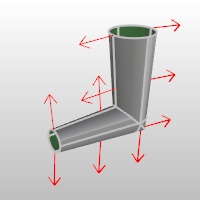
 Direction Analysis Panel
 Add Objects
Select more objects to analyze.
 Remove Objects
Remove selected objects from the analysis.
 Remove All Objects
Remove all objects from the analysis.
 Help
Help
Open the help topic.
 Toggle Direction Analysis Display
Show or hide direction analysis display on evaluated objects.
Show
Direction
Displays the object's normal direction in viewports.
■Color
Sets the display color for the direction arrows.
U (Surfaces only)
Displays the u direction.
V (Surfaces only)
Displays the v direction.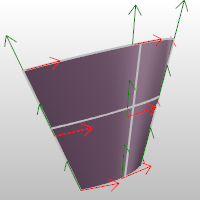
Reverses the direction.
Reverses the surface u direction.
Reverses the surface v direction.
Switches the u and v directions.
| Toolbar | Menu |
|---|---|
|
|
|

The ShowDirOff command closes the Direction Analysis control and turns off direction display.