 Hatch Properties
|
Toolbar |
Menu |
Shortcut |
|---|---|---|
|
|
Edit Object Properties Window Panels > Properties |
F3 |

Hatch properties manage object properties of the selected hatches.
Hatch Properties
Hatch pattern drop-down
 Browse Additional Patterns
Opens the Add Hatch Pattern To File dialog to adds built-in hatch patterns to the model.
 Search
Lists only the hatch patterns that have the input text in their names.
Pattern List
The thumbnails of available hatch patterns in the model.
Scale Slider
Move the slider to change the size of the pattern thumbnails.
 Grid view
Displays hatch patterns as large thumbnails arranged in a grid.
 List view
Displays hatch patterns in a vertical list with smaller previews.
Scaling types
The scaling type tabs let you filter the hatch patterns based on their scaling types.
 All
All
Lists all hatch patterns, regardless of scaling types.
 Layout
Lists only the hatch patterns that use layout units.
 Model
Model
Lists only the hatch patterns that use model units.
-
If a hatch pattern is set to use Model Units, it is not affected by Use Hatch Scaling.
Right-click context menu
Right-click the pattern list to show the context menu.
 Browse Additional Patterns
Opens the Add Hatch Pattern To File dialog to adds built-in hatch patterns to the model.
 Import Hatch Patterns
Imports hatch patterns from a .3dm or .pat file.
Previews Show Pattern Unit Outline Color
Distinguishes hatch pattern scaling types by outline colors: red for layout units and blue for model units.
Previews Show Pattern Unit Icon
Distinguishes hatch pattern scaling types by overlay icons: for layout units and for model units.
Base point
Displays the starting coordinates of the hatch pattern.
-
Click the
 button to pick the new location in the viewport by mouse.
Rotation
The rotation angle of the pattern.
-
Click the
 button to pick the rotation angle in the viewport by mouse with an in-viewport widget.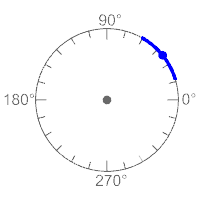
To use the in-viewport widget
-
Drag the center point to move the hatch base point.
-
Drag the dot on the rotation dial to change the rotation angle.
-
Hold the Shift key to rotate in 5-degree increments.
-
Double-click the blue dot to enter a specific angle.
-
Zoom in to display smaller tick marks on the rotation dial.
-
-
Hatches with History:
- Changing the pattern rotation angle will not break History.
- Rotating the hatch with its input boundary curve will not break History. The pattern rotation angle will update.
- Rotating the hatch alone will break History.
Hatches without History:
- Rotating the hatch will update the pattern rotation angle.
Scale
The scale factor of the hatch pattern.
Pattern Print Width
The print width for the pattern lines. It can be by layer, by parent, a specified width, or no print.
Boundary
Show Boundary
Displays the boundary curve around the hatch pattern.
Linetype
Sets the linetype used to display the hatch boundary.
Linetype Scale
Sets the scale factor for the boundary linetype.
Boundary Print Width
Sets the print width used for the hatch boundary.
Colors
Pattern Color
The colors of the hatch pattern when Fill Style is set to Solid.
Display
The display color can be by layer, by parent, use the current print color, or use a specified color.
Print
The print color can be by layer, by parent, use the current display color, or use a specified color.
Background Color
The colors fill the hatch boundary.
Display
The display color can be none (transparent), use the current print color, or use a specified color.
Print
The print color can be none (transparent), use the current display color, or use a specified color.
Boundary Color
The hatch boundary curve display these colors.
Display
The display color can be by layer, by parent, by pattern display color, use the current print color, or use a specified color.
The print color can be by layer, by parent, by pattern print color, use the current display color, or use a specified color.
-
Sync Print Color lets the display color control the print color.
Fill
Fill Style
Fill styles set the hatch pattern to use a single color or different types of gradient colors.
Change the hatch properties to match a different hatch.