ToSubDCrv
|
Toolbar |
Menu |
|---|---|
|
|
Curve Curve Edit Tools > To SubD Curve |

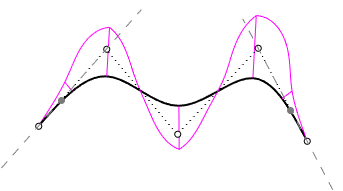
The ToSubDCrv command makes any curves SubD compatible.
-
A SubD friendly curve is a degree 3 uniform curve.
-
The second control points on both ends are constrained and locked. These points display with the locked object color.
-
The first and last three control points are always collinear to maintain zero curvature at both ends.
-
Moving or deleting Control Points or Edit Points will not destroy the SubD friendly characteristic.
-
SubD creation commands (LoftSubD, Sweep1SubD, Sweep2SubD...) create a better SubD object from SubD friendly curves.
See also

SelSubDCrv
Selects SubD curves.

ToNurbsCrv
Makes the constrained control points of a SubD friendly curve editable.