TiltView
| Toolbar | Menu |
|---|---|
|
|
View / Viewport title Set Camera > Tilt View |

The TiltView command rotates the view around the axis formed by the line between the view camera and target.
Steps
- Click and drag in a viewport to tilt the view.
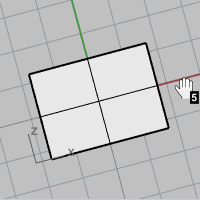
When the cursor moves near the right and left viewport edges, a snapping mode is enabled. The view rotation snaps in five-degree increments. The keyboard shortcut, Shift + Alt + Right mouse button displays a "5" to indicate the snap mode is on.
Command-line options
Angle
Sets the tilt angle used by the Left and Right options.
The default tilt angle is 6 degrees.
Left
Rotates the view anti-clockwise.
Keyboard shortcut: Ctrl (CMD) + Shift + PageUp
Right
Rotates the view clockwise.
Keyboard shortcut: Ctrl (CMD) + Shift + PageDn