Overlap
|
Toolbar |
Menu |
|---|---|
|
|
Edit Select Objects > Overlap |

The Overlap command finds duplicate points and completely or partially overlapping curves within a specified distance, and selects or deletes the redundant geometry.
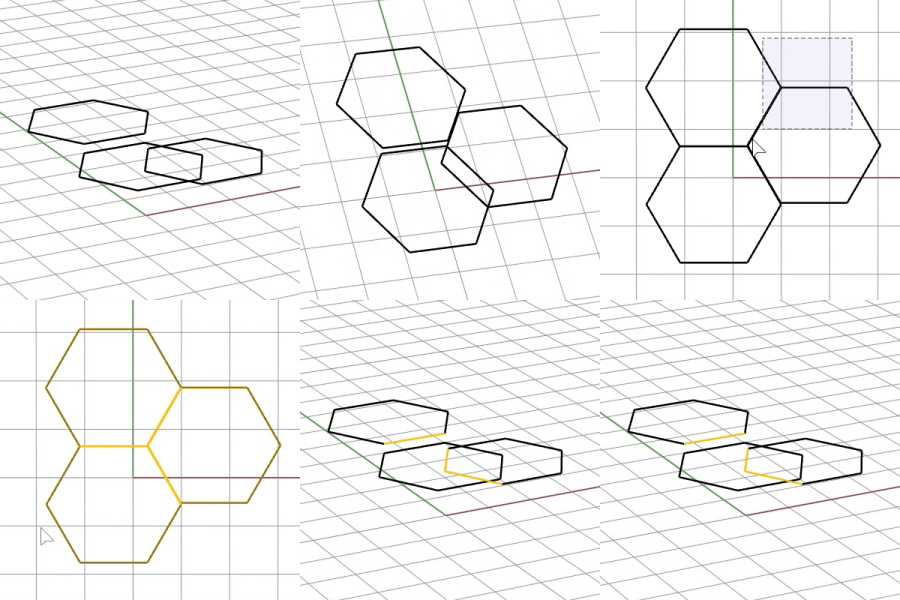
-
Surfaces and solids are not supported.
-
Objects are compared using their projections onto the current viewport's construction plane. Use a parallel view aligned with the intended 2-D plane, and avoid using a Perspective viewport when checking geometry stacked in 3-D.
Steps
-
Select points and curves to find overlaps.
-
Set the overlap options.
Options
Overlap Distance
Sets the maximum distance at which geometry is considered overlapping.
-
Start with a small overlap distance and increase it gradually when near-overlapping geometry is not found.
-
A smaller value requires the geometry to coincide more closely. A larger value detects geometry that is farther apart but may produce unintended results.
Mode
Specifies whether to find overlaps between whole curves or curve segments.
Whole Curves
Only finds curves whose entire lengths are overlapped. A curve is identified only when its complete length is overlapped. Use Segments mode to find partial overlaps.
Segments
Finds overlapping portions from curves that do not have complete overlaps.
Locked
Controls how locked objects participate in overlap comparisons.
Ignore
Excludes locked objects from the comparison.
Participate
Includes locked objects in the comparison.
Exclusive
Includes locked objects in the comparison but excludes overlaps among selected objects.
Delete Overlaps
Deletes overlaps rather than selecting them.
Only compare objects with matching
Color
Only compares objects with matching display colors.
Print Color
Only compares objects with matching print colors.
Layer
Only compares objects on the same layer.
Linetype
Only compares objects with matching linetypes.
Linetype Scale
Only compares objects with matching linetype scales.
Print Weight
Only compares objects with matching print weights.
See also

SelDup
Select geometrically identical objects.