Knife
|
Toolbar |
Menu |
|---|---|
|
|


The Knife command splits SubD faces along a polyline that you draw in a viewport.
-
The cut goes through the SubD in the view direction of the active viewport.
-
During the command, the SubD shows in box mode. The knife points are on the SubD control net.
-
A cut must start and end on an edge or a vertex. A cut that ends inside a face does not split the face.
Steps
-
Select a SubD.
To split only some faces, select faces on one SubD by holding Ctrl+Shift (Cmd+Shift on Mac) and clicking. Then press Enter.
-
Set command-line options.
-
Pick knife points.
After you pick the second knife point, points show where the cut crosses the edges.
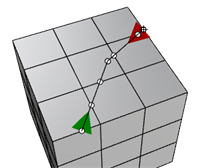
Indicators

The start of a cut. The arrow points along the cut.

The end of a cut.

The start (green) or end (red) arrow points almost straight toward you.

The start (green) or end (red) arrow points almost straight away from you.

A point where the cut crosses an edge. The cut adds a new vertex at this point. You can snap to it when you pick the next knife point.
-
Press Enter to split the faces.
Command-line options
FacesToSplit
Sets which faces the cut splits. This option is available until you pick the first knife point.
All
Splits all faces that the cut goes through, including faces on the back of the SubD.
FrontFacingOnly
Splits only the faces that face the active viewport.
Selected
Splits only the selected faces. During the command, the edges of the selected faces show as thick lines.
FacesToSplit is automatically set to Selected when faces are preselected, or when you select faces with Ctrl+Shift (Cmd+Shift on Mac) in the first step.
Undo
Removes the last knife point.
See also

InsertEdge
Inserts edges beside an edge loop or across an edge ring on a SubD or mesh.

InsertPoint
Adds vertices and edges to a Mesh or SubD along the picked points on edges.

Subdivide
Applies iterations of the Catmull-Clark subdivision to whole Mesh/SubD objects or selected faces.

SplitFace
Divides the selected surface of a polysurface by drawing a polyline, selected curves, or isocurves.