 Where can I find this command?
 Extrude
Extrude Solid
Surface Creation
Surface Sidebar
Menus
Solid and Surface
Extrude Curve
To Point
Where can I find this command?
Extrude
Extrude Solid
Surface Creation
Surface Sidebar
Menus
Solid and Surface
Extrude Curve
To Point
The ExtrudeCrvToPoint command creates a surface by tracing the path of a curve tapering to converge at a selected point.
Notes
| ● | If the curve is not planar, then it will be extruded in the z-direction of the active viewport's construction plane. If the curve is planar, it will be extruded in the normal direction of the plane of the curve. |
| ● | Unlike Lofts and Sweeps, the initial orientation of the profile curve or surface is maintained through the extrusion. |
| ● | If the input is a non-planar polycurve or a planar polycurve where the extrusion direction is not normal to the curve plane, the result will be a polysurface rather than an extrusion object. |
Command-line options
Solid
If the profile curve is closed and planar, both ends of the extruded object are filled with planar surfaces and joined to make a closed polysurface.
DeleteInput
Yes
Deletes the original geometry.
No
Retains the original geometry.
SplitAtTangents=Yes/No
The Yes option creates a single surface.
The No option creates a polysurface when the input curves are joined tangent curves. Faces in the resulting polysurface correspond to the tangent sub-curves in the input curves.
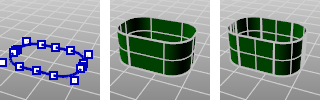
Original polycurve (left), SplitAtTangents=No (center), SplitAtTangents=Yes (right).
Notes
| ● | When this option is used, the output will be a polysurface. |
| ● | When UseExtrusions is on, this setting has no effect. |
See also
Rhinoceros 5 © 2010-2015 Robert McNeel & Associates. 17-Sep-2015

