Rebuild
| Toolbar | Menu |
|---|---|
|
|
Edit Rebuild |


The Rebuild command reconstructs selected curves or surfaces to a specified degree and control point number.
Steps
-
Select the curves or surfaces.
Or, press Ctrl (CMD) + Shift to select a polycurve segment.
Or, press Ctrl+Shift (Cmd+Shift on Mac) to select a surface edge.

Curves
To rebuild curves
-
Select a rebuild method, and set the options.
The preview updates when you change an option.
- Click OK.
Note
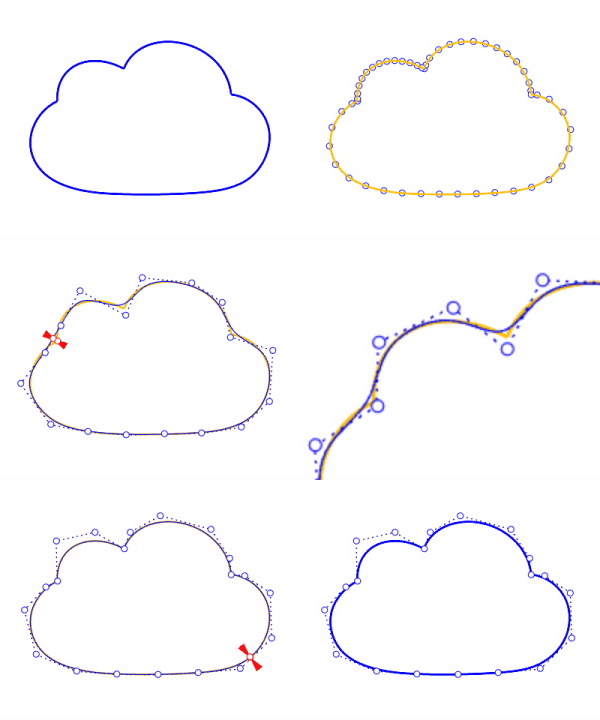
- Turn on control points and curvature graph to see the details of the curve structure.
- A group of curves will be rebuilt with curves of a specified degree and specified number of control points. The knot of the resulting curve more evenly spaced. To rebuild a curve with uneven knot spacing but a more accurate fit, use the FitCrv command.
 User's Guide - Edit Curves & Surfaces
Rebuild options
 Rebuild by point count
Rebuilds the curves with a specified number of control points.
Point count
Sets the number of control points in the rebuilt curves.
 Rebuild to tolerance
Rebuilds each curve with the fewest control points that keep the deviation within the tolerance.
The point count of each curve stays between Min point count and Max point count.
Min point count
Sets the lowest number of control points allowed in a rebuilt curve.
Max point count
Sets the highest number of control points allowed in a rebuilt curve.
Tolerance
Sets the maximum allowed deviation from the input curves. A check mark shows when the maximum deviation of the rebuilt curves is within the tolerance.
Degree
Sets the degree of the rebuilt curves, from 1 to 11.
 Preserve end tangents
Keeps the tangent directions at the start and end of the input curves.
Rebuild as SubD curve
Makes the rebuilt curves compatible with SubD. Details...
When this option is on, the degree is set to 3 and the Degree option is disabled.
Smoothing
Controls the smoothness of the rebuilt curves. Higher values result in greater deviation from the input curves.
Uniformity
Controls how evenly the control points are spaced along the rebuilt curves. Higher values result in more even spacing.
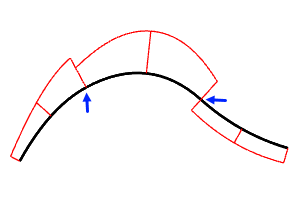
Kink splitting
Splits the rebuilt curves at kinks or at curvature changes. This option is only available for polycurves or curves with discontinuous curvature.
None - Do not split the curves.
G1 - Splits the curves at tangent breaks.
G2 large, G2 medium, G2 small - Splits the curves at large, medium, or small curvature changes.
Kink angle
Sets the minimum angle, in degrees, between adjacent curve segments that is considered a kink.
Show control points
Displays the control points of the rebuilt curves in the preview.
 Delete input
Deletes the original curves.
Create new object on current layer
Creates the rebuilt curves on the current layer. Otherwise, the rebuilt curves are created on the layer of the input curves.
Input
Reports the number of points, the degree, and the number of spans of the selected curves. When the curves differ, the range is shown, such as 83 to 91.
Output
Reports the same values for the rebuilt curves, and the maximum deviation from the input curves.
Surfaces
To rebuild surfaces
- Click Preview to see what the rebuilt surfaces will look like.
- When you are satisfied with the results, click OK.
Rebuild Surface Options
Point count
U
Reports in parentheses the current number and sets the number of points in the u direction.
V
Reports in parentheses the current number and sets the number of points in the v direction.
Degree
U
Reports in parentheses the current number and sets the degree in the u direction.
V
Reports in parentheses the current number and sets the degree in the v direction.
Point count and Degree values change automatically to fulfill the minimum requirement of Point count = Degree + 1. For example, when Point count=4 and Degree=3, reducing Point count also reduces Degree; increasing Degree also increases Point count. In closed curves/surfaces, the start and end points are overlapped and counted as one. They have one less point than open curves/surfaces.
Options
DeleteInput
Deletes the original geometry.
Current Layer
Creates the new surfaces on the current layer. Clear this checkbox to place the new surfaces on the layer of the original surfaces.
Retrim
Trims the rebuilt surface with the original trimming curves.
Span counts
U
Reports in parentheses the minimum number of spans and the proposed number of spans in the u direction.
V
Reports in parentheses the minimum number of spans and the proposed number of spans in the v direction.
Maximum deviation
Reports the maximum deviation from the original surface.
The calculation tests how far away the new surface is at knot line intersections and half-way between knot lines. Conducts tests at knot line intersections and halfway between knot lines.
The display color indicates how far away the new surface is from the original. Points are green if the surface is within absolute tolerance, yellow if it is between tolerance and 10 times tolerance, and red if it is farther away than that.
Displays a preview of the output.
If you change the settings, click the button again to refresh the display.
| Toolbar | Menu |
|---|---|
|
|
|


The RebuildUV command reconstructs selected surfaces to degree 3, with a specified control point number, in either the u or v direction. The surface structure in the other direction is left unchanged.
Steps
- Select surfaces to rebuild.
| Command-line options | |
|---|---|
|
Direction |
Specify the u, v, or both directions. |
|
PointCount |
Specifies the number of control points in the result. |
|
Type |
LooseThe surface control points are created at the same locations as the control points of the original. This is a good option if the control points will be edited later. NormalThe surface has an average amount of stretching between the curves. This is a good choice when the curves are proceeding in a relatively straight path or there is a lot of space between the curves. Straight sectionsCreates a ruled surface. The sections between the curves are straight. TightThe surface closely follows the original. This is a good choice when the input curves are going around a corner. UniformMakes the object knot vectors uniform. |
|
DeleteInput |
YesDeletes the original geometry. NoRetains the original geometry. |
|
CurrentLayer |
The output will be on the current layer. |
|
Trims the rebuilt surface with the original trimming curves. |
|
| Toolbar | Menu |
|---|---|
|
|
|

The RebuildCrvNonUniform command interactively modifies selected curves by non-uniformly re-spacing the control points.
Steps
- Select the curves.
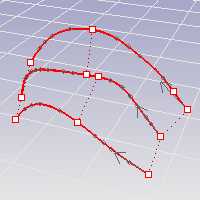
- Drag the points on the curves.
- Click the direction arrows to reverse the curve direction.
| Command-line options | |
|---|---|
|
RequestedTolerance |
Specifies the maximum distance the rebuilt curves can deviate from the originals. If you do not provide enough control points, the rebuilt curves may deviate more than RequestedTolerance from the originals. The maximum deviation from the original curves is reported at the command line and marked with a point on the curve. |
|
MaxPointCount |
Specifies the maximum number of control points per curve used to rebuild. |
|
Quarters |
Displays two more controls along each curve to influence how the RebuildCrvNonUniform command distributes control points. The controls at the end of the curves can be used to shorten the resulting curves. |
|
DeleteInput |
YesDeletes the original geometry. NoRetains the original geometry. |
|
ResetPoints |
Resets the editing points to their original locations. |
|
Type subcrv to select part of a curve as input. |
|
See Also

Rebuild
Reconstruct curves, surfaces, and extrusion objects to a specified degree and control point number.