 Where can I find this command?
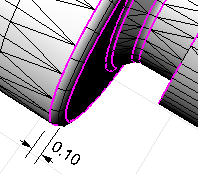
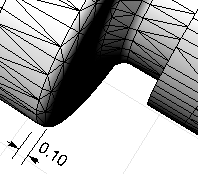
The MatchMeshEdge command moves face edges of an open mesh to meet adjacent face edges.
Note
| ● | First, the command will try to match vertices, then it will try to split edges to make the edges match. |
| ● | No part of the mesh is moved more than the specified tolerance. |
| ● | You can use this command either on the complete mesh or on selected edges. |
| ● | When selecting a whole mesh, using a high tolerance can create unexpected results. Use larger tolerances only if you select specific edges to close. |
| ● | Before edge matching, magenta edges are open. |
Steps
Select a mesh edge.
Options
PickEdges
Select specific edges to match.
DistanceToAdjust
Specify the tolerance distance.
RatchetMode
Matching the mesh takes place in four passes starting at a tolerance that is smaller than your specified tolerance and working up to the specified tolerance with successive passes. This matches small edges first and works up to larger edges.
Notes
| ● | Some STL/SLA printers have problems if meshes contain many long, thin facets. These can slow the printer's slicing process down, produce odd printed results, and run the printer out of memory. |
| ● | The MeshRepair command may be useful when tuning up meshes for STL/SLA printing. |
See also
Rhinoceros 5 © 2010-2015 Robert McNeel & Associates. 17-Sep-2015

