 Where can I find this command?
The DeleteMeshFaces command removes selected mesh faces from the parent mesh creating a hole to help repair and close mesh files for rapid prototype printing.
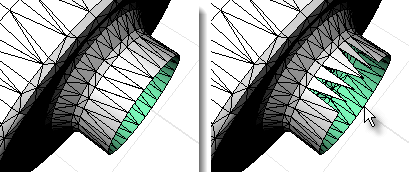
Note: This command is most effective in a shaded display mode since you can pick within a shaded mesh facet to select it.
Steps
Select mesh faces.
Notes
| ● | Some STL/SLA printers have problems if meshes contain many long, thin facets. These can slow the printer's slicing process down, produce odd printed results, and run the printer out of memory. |
| ● | The MeshRepair command may be useful when tuning up meshes for STL/SLA printing. |
See also
White paper: Scan, Cleanup, Remodel
Rhinoceros 5 © 2010-2015 Robert McNeel & Associates. 17-Sep-2015

