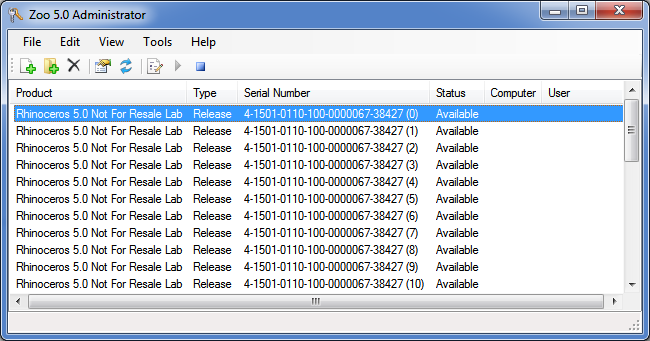
Licenses can be managed by running the Zoo Administrator (ZooAdmin.exe).
Zoo licenses have three states, check can be viewed in the Zoo Administrator:
Available - the license is not in use.
In use - the license is loaned out, or in use.
Checked out - the license has been checked out on a semi-permanent basis.
The Zoo will automatically recover loaned licenses due to either network interruption or abnormal product shut down.
There may be an occasion where you will be required to do this manually. To recover an "in use" license, select the license from the list and then click Edit → Recover.
Note, recovering licenses that are still in use can lead to license conflicts.
The Zoo can allow licenses be checked out, on a semi-permanent basis, so laptop users can disconnect from the network. The licenses can be checked in again when the laptop is reconnected to the network.
There may be an occasion where you will be required to do this manually. To check in a checked out license, select the license from the list and then click Edit → Recover.
Note, checking in licenses that are still checked out can lead to license conflicts.
The Zoo allows administrators and users to monitor license usage from the convenience of their web browser. Just visit the "status" page provide by your Zoo server by entering:
http://<zoo_server_host_name>/status
into your favorite web browser. For example, if your Zoo server's host name is zooserver.mycorp.com, then you'd enter:
http://zooserver.mycorp.com/status
The Zoo can export a comma-separated-value (.CSV) file that contains the serial numbers (not CD keys) of all licenses maintained by the Zoo. This can be useful if you have difficulties in locating all of your product CD keys. You can export the serial number and then e-mail them to McNeel, who in turn can look up your misplaced license information. To export serial numbers, click File → Export.
The Zoo stores licenses in the following folder:
%PROGRAMDATA%\McNeel\Zoo\5.0\Licenses
Note, Zoo license files cannot be moved from Zoo server to another Zoo server.
Also note, it is not possible to recover lost product license codes or CD keys from the Zoo. So, make sure to store your product license codes and CD keys in a safe location.
The Zoo stores usage tracking files in the following folder:
%PROGRAMDATA%\McNeel\Zoo\5.0\Usage