 Where can I find this command?
MatchMeshEdge 指令可縫合網格物件的縫隙。
附註
| ● | 此指令會先將網格頂點銜接,再分割網格邊緣,銜接多餘的網格頂點。 |
| ● | 網格中任何部分的移動距離都不會大於設定的公差。 |
| ● | 此指令可以用在整個網格或只用在選取的網格邊緣。 |
| ● | 選取整個網格時使用較大的公差可能會產生不可預期的結果,最好只在您想要封閉特定的網格邊緣時才使用較大的公差值。 |
| ● | 洋紅色的網格邊緣是銜接前的縫隙。 |
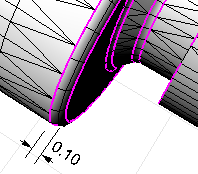
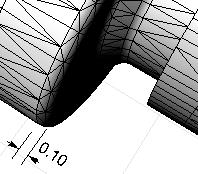
步驟
| 4 | 選取一個網格邊緣。 |
選項
選取網格邊緣
選取要銜接的特定網格邊緣。
要調整的距離
設定距離公差。
漸增模式
網格邊緣銜接會經過四個階段,從小於您所設定的公差開始,每個階段逐步加大公差直到您所設定的公差,使較短的網格邊緣先被銜接,然後再銜接較長的網格邊緣。
Notes
| ● | Some STL/SLA printers have problems if meshes contain many long, thin facets. These can slow the printer's slicing process down, produce odd printed results, and run the printer out of memory. |
| ● | The MeshRepair command may be useful when tuning up meshes for STL/SLA printing. |
請參考

